
One contact center for every conversation.
Every way a customer reaches you lands in one inbox — email, text, phone, live chat. From there you can quote them, invoice them, book them, sign a contract with them and meet them on video without leaving the app.
- ✓ Unified inbox — chat, email & SMS in one thread view
- ✓ Full VoIP phone system — IVR, queues, voicemail & analytics
- ✓ Video rooms with guest join, screen share & recording
- ✓ Built-in CRM — contacts, leads pipeline & scheduling
- ✓ Billing, contracts, projects & help center modules
Every channel. Every tool. One workspace.
Communication, CRM, and business operations — built into the same platform, not bolted on.
Inbox
- ✓ Open / Later / Snoozed / Done
- ✓ Snooze until a time you pick — then it returns to the top
- ✓ Assign a conversation so two people don't reply at once
- ✓ Tags you define, reorder and colour-code
- ✓ Saved replies — type a shortcut, get a full answer
- ✓ Sequences — scheduled follow-ups until they reply
- ✓ Blocked senders — messages refused, not hidden
- ✓ Shared inboxes — support@ and sales@ to different teams
Phone
- ✓ Call and answer in-app, with their history on screen
- ✓ Voicemail with transcription, recording & full history
- ✓ Caller panel — notes mid-call, follow-up saved to the contact
- ✓ IVR, ring groups, extensions, transfer & conference
- ✓ Business hours — calls route differently after you close
- ✓ Power dialer for working a list
- ✓ Call back or text back straight from the call log
Video meetings
- ✓ Schedule with a set duration; attendees get reminders
- ✓ Invite more people from inside a running meeting
- ✓ Chat and file sharing during the call
- ✓ Screen sharing and guest join by link
- ✓ Ending the meeting disconnects everyone — it doesn't linger
Contacts & Leads
- ✓ Notes and follow-up reminders on every contact
- ✓ Full conversation history across every channel
- ✓ Segments — saved filters like “Ohio, hasn't bought yet”
- ✓ CSV import and export
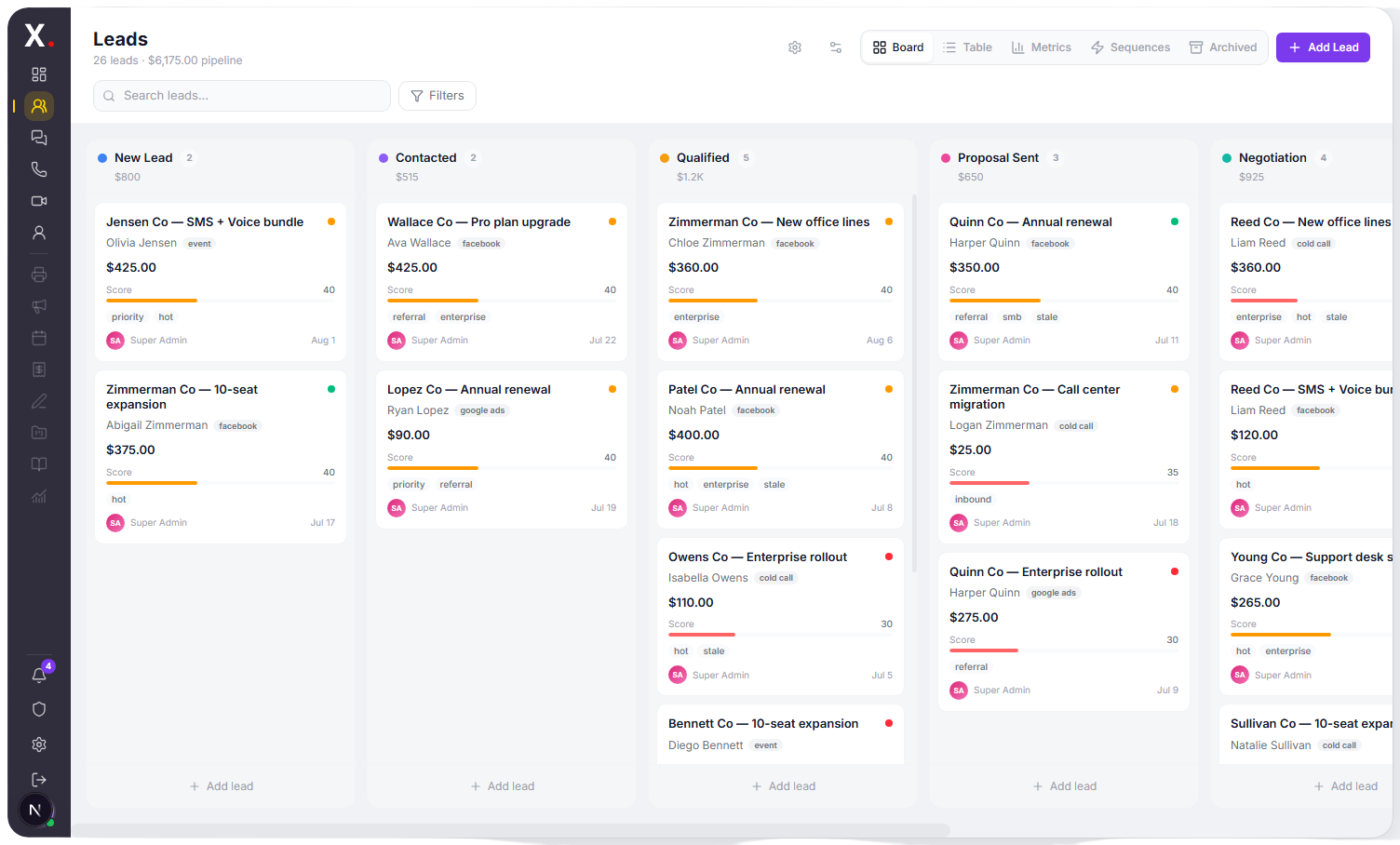
- ✓ Leads pipeline — drag a card between your stages
- ✓ Lead scoring, so you work the warm ones first
- ✓ Automation that moves and nudges them for you
Bringing work in
- ✓ Chat widget — a bubble on your site, landing in your inbox
- ✓ Forms — embed one; submissions become contacts
- ✓ Campaigns — templates, drag-and-drop designer, open & click tracking
- ✓ Bots — answer common questions, hand off when stuck
Calendar & getting paid
- ✓ Appointments and scheduling with reminders
- ✓ Proposals — a quote they accept with one click
- ✓ Invoices — one-off or recurring
- ✓ Payment links — takes a card, no invoice needed
- ✓ Item catalog, so you stop retyping your prices
Contracts & Projects
- ✓ Upload a document and mark where people sign
- ✓ See who opened it and who signed
- ✓ Audit trail, if it is ever questioned
- ✓ Tasks, milestones and time tracking
- ✓ Client portal — customers watch progress without asking
Help Center & AI
- ✓ Public knowledge base on your own domain
- ✓ Your chat widget searches it, so the bot answers from real articles
- ✓ Writing assistant — drafts and rewrites replies in the inbox
- ✓ AI Attendant — answers the phone, takes messages, routes calls
- ✓ Call transcription — a summary and the follow-ups it produced
Reports & your workspace
- ✓ Conversation volume and response times
- ✓ Per-channel and per-agent breakdowns
- ✓ Call analytics and CSAT surveys
- ✓ Roles — owner, admin, agent, viewer
- ✓ Two-factor authentication and an audit log
- ✓ Notification preferences and custom branding on Business
Every channel. One inbox.
Email, text, phone and live chat land in the same thread view — one easy-to-use platform, no tab-hopping.
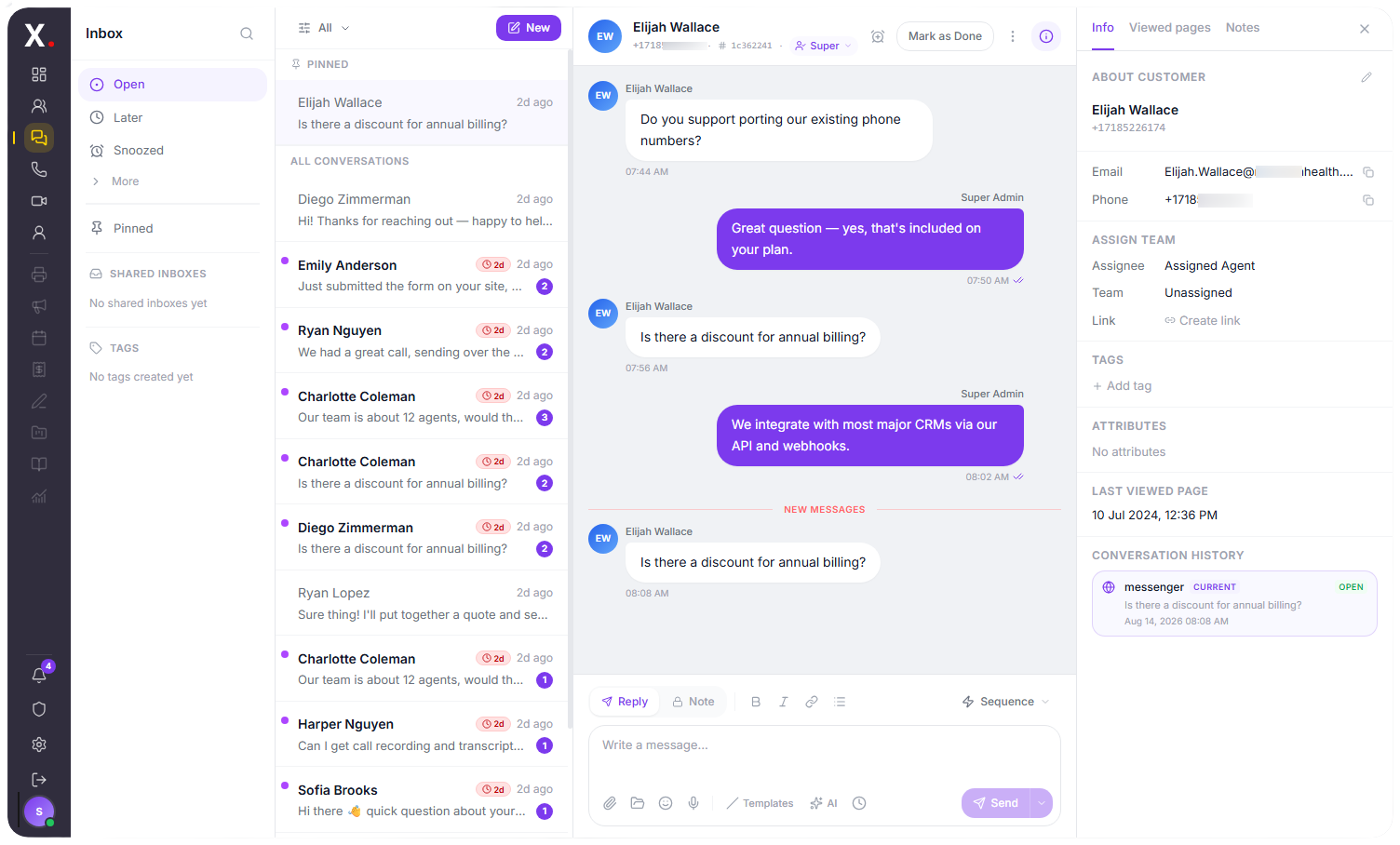
Answer everything, from one screen.
Whether a customer messages your website chat, texts your business number, calls you, or sends an email — it arrives in the same inbox, threaded to their contact profile. Your team replies from one place, and the customer gets the answer on the channel they chose.
- ✓ Open / Later / Snoozed / Done, with assignment
- ✓ Tags, saved replies & scheduled sequences
- ✓ Blocked senders — refused, not hidden
See it the way your team will.
Real screens from the Abbax Contact Center. Pick a card to switch views.
Every deal, on one board.
Drag leads through your stages, score them automatically, and see pipeline value at a glance. Board, table, metrics, and sequence views — the same data, your way.
Run the business, not just the conversations.
The work that happens after the call — quoting, signing, billing, delivering — lives in the same platform.
Billing
Proposals a customer accepts with a click, invoices one-off or recurring, and payment links that just take a card. Paid through Stripe or Square.
Contracts
Upload a document, mark where people sign, send it. You see who opened it and who signed, with an audit trail if it is ever questioned.
Projects
Tasks, milestones and time tracking — with a client portal so your customer can see progress without emailing to ask.
Help Center
A public knowledge base at your own domain. Customers search it before they contact you — and your chat widget searches it too, so the bot answers from your real articles.
Self-serve admin. No tickets to change a setting.
Everything your admins need is in the workspace — from roles to integrations to the audit log.
Workspace settings cover the day-to-day: your team, your tags, your templates, and the integrations that connect Abbax to the rest of your stack.
Four roles, and an audit log
Owner, admin, agent and viewer — so people get the access their job needs and nothing beyond it. Two-factor authentication, notification preferences and an audit log of workspace changes sit alongside them.
Which modules appear depends on your plan and the add-ons you have switched on, so each team sees exactly the tools they use — nothing they don't.
We replaced five tools — help desk, dialer, e-sign, invoicing, and our CRM — with one Abbax workspace. New agents learn one screen instead of five, and nothing falls between systems anymore.
Plans that scale with your team.
Priced per seat, with unlimited agents and unlimited conversations on every plan. Add only the modules you actually use.
- ✓ Unlimited agents & conversations
- ✓ 5 channels
- ✓ 500 text messages/mo, then 3¢ each
- ✓ Inbox, contacts & calendar
- ✓ Email & text messaging
- ✓ Video meetings
- ✓ Forms, chat widget & saved replies
- ✓ Two-factor authentication
- ✓ 10 channels
- ✓ 2,000 text messages/mo, then 3¢ each
- ✓ Leads pipeline & lead scoring
- ✓ Shared inboxes & teams
- ✓ Invoices, proposals & payment links
- ✓ Reports, CSAT & Help Center
- ✓ Bots, sequences & segments
- ✓ 15 channels
- ✓ 5,000 text messages/mo, then 3¢ each
- ✓ Projects & time tracking
- ✓ Contract signing
- ✓ Audit log
- ✓ Remove platform branding
Add-on modules
Extend any plan with the modules you need — only pay for what you use. Several of these are already included once you reach Pro or Business.
A business number with IVR, ring groups, extensions and voicemail.
An AI receptionist answers your calls. Flat monthly fee with a minute allowance.
Every recorded call written up, with a summary and the follow-ups it produced.
Send and receive faxes. Flat monthly fee with a page allowance.
Email campaigns, templates, and open & click tracking.
Scheduling, appointments and job management.
Invoices, proposals, recurring billing and payments.
Tasks, time tracking, milestones and a client portal.
Document signing with multiple recipients and an audit log.
Knowledge base on your own domain, with widget search.
Advanced dashboards, channel stats and reports.
Does the Contact Center include a phone system, or do I need one separately?
Will every user see all the modules listed on this page?
Can I bring my existing phone numbers?
What integrations are supported?
Can I send and receive faxes from the Contact Center?
One platform for your whole front office.
Schedule a demo — see your inbox, phone, and pipeline set up live with your own numbers and channels. No pressure, no contract.